
Skip to content

Innovating personal audio & workspace tech since 2005 — designed in Carlsbad, California

0%

Choosing among Mechanical Gaming Keyboards is no longer a simple matter of selecting colorful keycaps. Players now compare switch feel, response time, construction, software support, and long-session comfort. The Entertainment Software Association reported in its 2024 Essential Facts survey that 190.6 million Americans play video games each week. Newzoo’s 2024 Global Games Market Report also estimated a worldwide gaming audience of more than 3.4 billion people. These figures show a large and demanding audience, but they do not prove that every player needs an expensive keyboard.

Real use matters more than a specification sheet. A linear switch may feel smooth during rapid movement, while a tactile switch can provide clearer feedback for typing and strategy games. A metal frame may reduce flex, yet it can add weight and desk noise. Grand View Research identifies gaming peripherals as a growing technology market, but broad market forecasts cannot measure individual comfort or long-term reliability. That limitation deserves attention.

Small details matter.

This guide presents 10 practical tips for choosing Mechanical Gaming Keyboards. It considers switch durability, hot-swappable sockets, polling rate, key rollover, stabilizer quality, acoustic behavior, and software privacy. It also examines layout size, wrist position, warranty terms, and repairability. These factors often matter after the excitement fades. A keyboard that sounds impressive in a product video may become tiring beside a microphone. I may favor measurable performance, but personal preference remains unavoidable. Readers should test key weight, sound, and spacing whenever possible before purchasing.
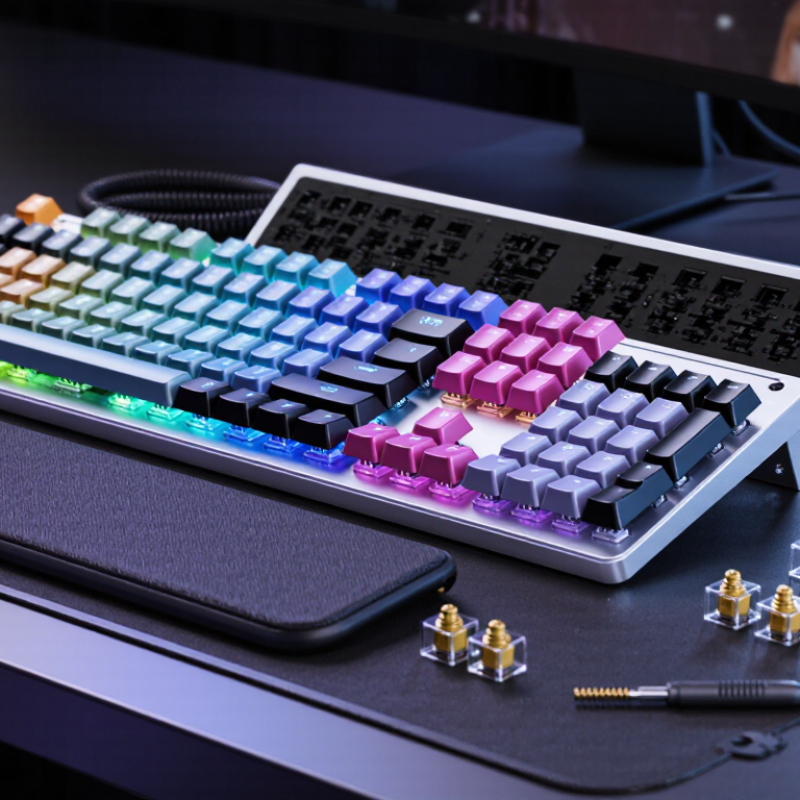
10 Tips for Choosing Mechanical Gaming Keyboards

Identify Switch Types by Their 50–100 Million-Actuation Lifespans

10 Tips for Choosing Mechanical Gaming Keyboards

Switch lifespan is a useful specification, but it is not a complete quality test. Technical datasheets from several switch suppliers commonly list 50–100 million actuations. These figures usually come from controlled laboratory endurance testing, not everyday gaming. IEC 61058-1 also treats endurance as a test condition, rather than a guarantee for every user.

Look beyond the headline number. Linear switches often suit rapid movement because their travel feels smooth and uninterrupted. Tactile switches provide a noticeable bump, which can help confirm each press during long sessions. Clicky switches add audible feedback, but shared rooms may expose their weakness quickly. Keycap wear, dust, stabilizer noise, and controller electronics can fail before the switch mechanism does. The number is only one clue.

A 2024 mechanical keyboard market analysis by Grand View Research identifies durability and customization as important purchase factors. However, market reports measure demand and growth, not real-world switch survival. That distinction matters. I have seen keyboards rated for 100 million presses develop uneven stabilizers much earlier. Testing your preferred switch remains more reliable than trusting a large figure. Press a sample slowly, then repeatedly. Notice spring return, wobble, and fatigue. Fifty million presses sounds enormous. It may still feel wrong.

Compare Linear, Tactile, and Clicky Switches at 35–60 gf

Choosing a mechanical gaming keyboard starts with understanding switch force, measured in gram-force (gf). The 35–60 gf range suits many players because it balances speed, control, and finger fatigue. A 35 gf switch feels light and quick, especially during repeated movement inputs. However, accidental presses become more likely. A 60 gf switch demands firmer pressure, which can feel stable during intense play. It may also tire your fingers during long sessions.

Linear switches press smoothly from top to bottom, without a bump or click. They work well for rapid key presses and consistent strafing. Tactile switches provide a noticeable bump near the actuation point. That feedback can reduce accidental inputs, although it may slow unfamiliar users. Clicky switches add a sharp sound and tactile event. Their feedback feels satisfying, but shared spaces may not appreciate the noise. Test all three if possible.

In my own comparisons, spring weight mattered less than expected. Keycap shape, actuation distance, and typing posture changed the experience. A 45 gf tactile switch felt comfortable for writing, yet slightly distracting during fast games. My preference also changed after several hours. That matters. Switch specifications can vary, so treat 35–60 gf as a guide, not a guarantee. Check measured force curves, stabilizer quality, and return consistency before choosing.

Evaluate Gaming Latency Through 1,000 Hz Polling and 1 ms Response

A 1,000 Hz polling rate means the keyboard reports input every millisecond. That sounds impressive, but polling is only one part of gaming latency. The switch, firmware, USB controller, operating system, and game engine also add delay. Independent laboratory testing published by RTINGS shows that keyboards with similar polling rates can still produce noticeably different total latencies.

Test the number, not the box.

Use a consistent setup. Connect the keyboard directly to the computer, disable wireless modes, and record repeated key presses with a high-speed camera or latency tester. Check the median and the slowest results. A single best measurement can hide unstable firmware behavior. Technical guidance from the USB-IF confirms that 1,000 Hz creates a maximum one-millisecond polling interval, but it does not guarantee a one-millisecond end-to-end response.

Look for measured response below two milliseconds, stable results across repeated tests, and adjustable scan-rate settings. Independent reviews from RTINGS also separate key actuation latency from total system latency, which is a useful distinction during comparison. In fast shooters, a delayed movement can feel like a missed input. Still, the difference may be difficult to notice outside competitive play. I have found that consistent actuation matters more than a dramatic specification.

Do not ignore debounce behavior. Some keyboards reduce it aggressively, yet occasional double inputs may appear. That trade-off deserves testing. A reliable keyboard should feel predictable under rapid tapping, not merely advertise 1 ms.

10 Tips for Choosing Mechanical Gaming Keyboards - Evaluate Gaming Latency Through 1,000 Hz Polling and 1 ms Response

Tip Evaluation Dimension Useful Specification or Measurement What to Check Why It Matters
1 Polling rate 1,000 Hz = one USB report every 1 ms Confirm that the keyboard can operate at 1,000 Hz consistently rather than only in a special mode. A higher polling rate reduces the maximum waiting time before a key-state change is reported, although it does not determine total input latency by itself.
2 End-to-end input latency Target a measured average near 1 ms for fast wired gaming modes Look for independent measurements covering switch sensing, firmware processing, USB reporting, and debounce behavior. The 1 ms response figure should be treated as a performance target; real latency can vary with hardware, settings, and test method.
3 Switch actuation point Common mechanical actuation range: approximately 1.0–2.2 mm Choose a consistent actuation point that suits rapid key presses and accidental-input control. Actuation distance affects when a key is registered, but a shorter distance does not automatically guarantee lower total latency.
4 Debounce handling Adjustable or low debounce settings, verified through testing Check whether debounce can be configured without causing double inputs or missed presses. Mechanical contacts may produce electrical chatter; debounce filtering improves reliability but can add processing delay.
5 Connection mode Wired USB is generally the most predictable for competitive play Compare wired, 2.4 GHz wireless, and Bluetooth modes separately rather than assuming identical performance. Wireless latency and stability depend on radio mode, interference, power management, distance, and receiver placement.
6 Key rollover and anti-ghosting N-key rollover is preferable for simultaneous multi-key input Test common combinations such as movement keys, modifiers, and several simultaneous presses. Rollover capability helps ensure that intended key combinations are detected accurately during complex gameplay.
7 Scan rate and firmware Scan frequency should support the selected 1,000 Hz reporting mode Check firmware update support, onboard profiles, and whether performance settings remain active after restarting. A fast USB polling rate cannot compensate for slow internal scanning or firmware processing.
8 Keycap profile and stability PBT or ABS keycaps; inspect wobble, texture, and legends Check whether frequently used keys remain stable and readable after extended use. Keycap feel and stabilizer quality influence control, comfort, and consistency even when electronic latency is low.
9 Layout and ergonomics Choose among full-size, tenkeyless, 75%, or compact layouts Verify spacing, wrist position, cable placement, adjustable feet, and access to essential keys. A suitable layout can reduce hand movement and fatigue, which may improve practical performance over long sessions.
10 Durability and maintenance Hot-swappable sockets, replaceable switches, and a rated switch lifespan Review switch replacement options, spare-part availability, cable quality, and resistance to dust or spills. Repairable construction can preserve consistent key feel and performance for a longer service period.
Latency reference: Polling interval = 1,000 ÷ polling rate. Therefore, 125 Hz ≈ 8 ms, 500 Hz ≈ 2 ms, 1,000 Hz ≈ 1 ms, and 2,000 Hz ≈ 0.5 ms. These values describe the reporting interval, not guaranteed end-to-end response time.

Check N-Key Rollover, Anti-Ghosting, and Full-Key Input Accuracy

When choosing a mechanical gaming keyboard, do not judge performance by switch feel alone. Test how accurately it registers several keys at once. During fast gameplay, your fingers may hold W and Shift while pressing A, Space, and a number key. The keyboard should recognize every input without dropping or inventing commands.

Tip: Check N-key rollover in the specifications and test it yourself. Open a keyboard testing tool, then press multiple keys together. A reliable board should display each key immediately. Test common combinations, not only easy patterns. Some keyboards advertise strong rollover performance, yet behave differently through wireless connections or certain USB modes.

Tip: Look for anti-ghosting across the full key area. Ghosting can create an unwanted keystroke when several nearby keys are pressed. Try clusters around WASD, the arrow keys, and modifier keys. Also examine full-key input accuracy. Hold several keys for five seconds, release them separately, and watch for delayed or repeated signals. I once trusted a specification sheet and skipped this simple test. That was a mistake.

Tip: Repeat the test after changing connection modes or computer settings. Firmware and input software can affect results. A stable keyboard should respond consistently, even during frantic sequences. Do not rely only on a retailer’s sentence. Your hands reveal more.

Match Keyboard Size, Keycaps, Software, and Platform Compatibility

10 Tips for Choosing Mechanical Gaming Keyboards

A gaming keyboard should match your desk, hands, and platform. Newzoo’s 2024 Global Games Market Report estimated 3.42 billion players worldwide. That scale makes compatibility more important than flashy specifications. Choose a compact layout for limited space, or a full-size layout if you regularly use a number pad. Tenkeyless models often balance movement room and everyday productivity. Measure your desk first. It sounds obvious, but many buyers forget.

Tip: Check keycap shape and material. PBT keycaps usually resist shine better than ABS, especially around frequently used movement keys. Compare legends, texture, and replacement availability. A standard layout can simplify future upgrades. Unusual layouts may look attractive, yet replacement keycaps can become frustrating. I once underestimated this detail. It was inconvenient.

Software should offer clear remapping, profiles, lighting control, and onboard memory. Onboard storage matters when moving between computers or using a system without companion software. Review the privacy policy and required permissions before installing any utility. Steam Hardware & Software Survey reports have consistently shown desktop operating systems dominate PC gaming, but smaller shares still matter. Therefore, confirm support for your operating system, not merely the included installer.

Tip: Test platform compatibility before purchasing. Wired USB connections are usually the safest choice for desktops and consoles. Wireless models need verified support, stable switching, and acceptable latency. Check whether remapping works without software on your target device. Also confirm console recognition, tablet support, and firmware-update requirements. Manufacturer claims can be incomplete. Read independent measurements and user reports.

FAQS

Does a 50–100 million-actuation rating guarantee a long-lasting keyboard?

No. It usually comes from controlled laboratory testing. Keycaps, stabilizers, dust, or electronics may fail earlier. The number is only one clue.

Which switch type suits fast gaming movement?

Linear switches provide smooth, uninterrupted travel. They may feel quick during repeated movement. Tactile switches add a noticeable bump for press confirmation. Clicky switches provide sound but may disturb nearby people.

How can I test a switch before buying?

Press a sample slowly and repeatedly. Notice spring return, wobble, noise, and finger fatigue. A switch can look excellent on paper but feel wrong in practice.

Does 1,000 Hz polling guarantee one-millisecond gaming response?

No. It reports input every millisecond at most. Switches, firmware, USB controllers, operating systems, and games add more delay. The box number does not tell the whole story.

What latency measurements should I look for?

Look for measured response below two milliseconds. Results should remain stable across repeated tests. Check both actuation latency and total system latency. Consistency matters more than a dramatic specification.

How can I test keyboard latency at home?

Connect the keyboard directly to the computer. Disable wireless modes during testing. Use a high-speed camera or latency tester. Record repeated presses, including slowest results.

Should I choose a full-size, tenkeyless, or compact keyboard?

Measure your desk before choosing. Full-size layouts include a number pad. Tenkeyless models leave more mouse space. Compact layouts suit smaller desks, but unusual layouts may complicate keycap replacement.

Are PBT keycaps always the better choice?

PBT keycaps usually resist shine better than ABS keycaps. Still, compare texture, legends, and replacement availability. I once ignored this detail. It became inconvenient later.

What software and compatibility details require attention?

Check remapping, profiles, lighting controls, and onboard memory. Confirm support for your operating system and target devices. Wired USB is usually the safer option. Wireless models need stable switching and tested latency.

Can aggressive debounce settings improve gaming performance?

They may reduce input delay, but double inputs can appear. Test rapid tapping carefully. Predictable behavior matters more than a tiny theoretical advantage.

Conclusion

Choosing Mechanical Gaming Keyboards requires more than focusing on appearance or price. Start by identifying the switch type and its expected lifespan, with many options rated for approximately 50–100 million actuations. Linear switches provide smooth, consistent presses, tactile switches offer a noticeable bump, and clicky switches add audible feedback; actuation force commonly ranges from 35–60 gf. Consider gaming performance as well, including a 1,000 Hz polling rate and response times near 1 ms for quick input registration.

Reliable key detection is equally important. N-key rollover, anti-ghosting, and full-key input accuracy help ensure every command is recognized during fast-paced gameplay. Finally, select a size that suits your desk and play style, compare keycap durability and comfort, and confirm that the keyboard’s software works with your operating system and preferred platform. A balanced choice should combine responsive switches, dependable accuracy, useful customization, and comfortable long-term use.

Amelia

Amelia

Amelia is a dedicated marketing professional who combines a strong understanding of the company’s products with a clear, customer-focused approach to communication. She regularly contributes expert articles to the company website, helping readers understand product features, practical applications,......