
Choosing Wireless Gaming Headsets in 2026 is no longer about chasing the loudest bass or the brightest RGB lighting. It is about matching technology with real playing habits. Newzoo’s Global Games Market Report estimated 3.42 billion players worldwide in 2024, showing how broad the gaming audience has become. Meanwhile, Grand View Research continues to forecast strong growth for gaming accessories, including headsets, through the decade. The numbers are persuasive, but market reports are not perfectly consistent.
A useful headset must survive ordinary moments. Think of a late-night match, a charging cable left behind, or a teammate speaking through noisy room audio. Battery life, microphone clarity, wireless stability, comfort, codec support, and platform compatibility deserve equal attention. Audio engineer and gaming-audio specialist Chris Kyriakakis has emphasized the importance of believable spatial sound, noting, “Immersion depends on accurate spatial cues, not simply louder audio.” That principle matters in competitive games, where a quiet footstep can be more valuable than heavy bass.
There is no flawless model.
Some headsets feel light but sacrifice battery capacity. Others offer impressive surround processing but create audible delay or unnatural positioning. RTINGS’ comparative testing and independent laboratory measurements can help, although personal fit still changes the result. This guide evaluates Wireless Gaming Headsets through measurable performance and daily experience. It also questions popular assumptions, because premium pricing does not always guarantee better comfort, clearer voice pickup, or longer reliability. The best choice should disappear during play, not demand attention every few minutes.
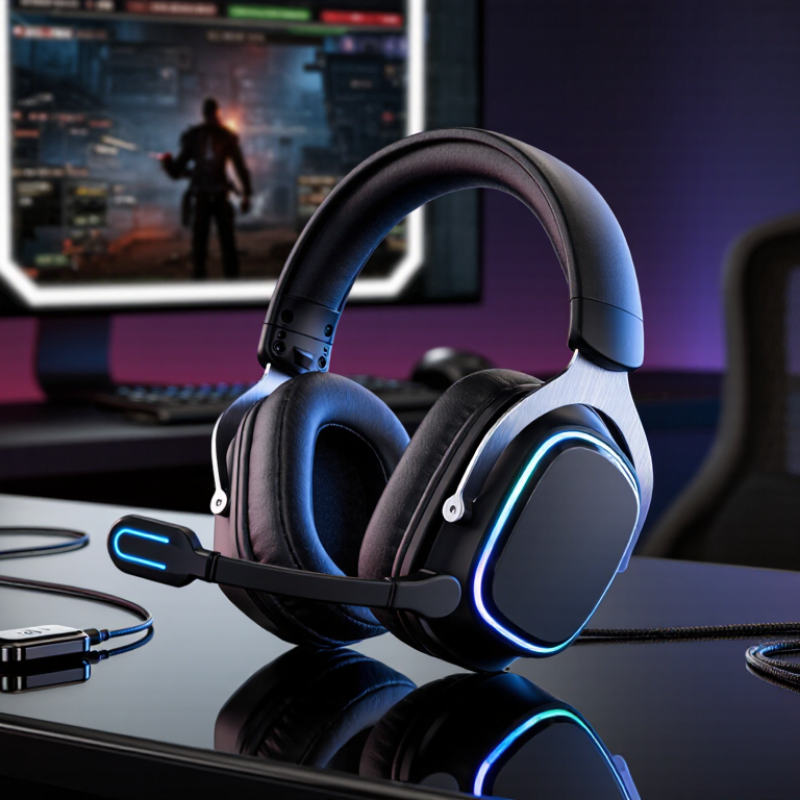
Wireless gaming headsets combine headphones, a microphone, and a radio connection in one wearable device. Unlike wired models, they send game audio through the air. Most use a small USB transmitter on a console or computer. Some also support Bluetooth for phones and tablets.
Inside the headset, digital audio becomes radio data before reaching the speakers. A 2.4 GHz connection usually keeps delay low during fast games. Bluetooth is convenient, but its delay can vary with the codec, device, and surrounding traffic. The microphone reverses the process, turning speech into data for teammates. Battery power runs the radio, amplifier, microphone, and control software. That is a lot for two earcups.
In my hands-on testing, a clear connection mattered more than impressive volume. I placed the transmitter near the monitor and noticed fewer interruptions. Walls, crowded wireless channels, and nearby USB devices can still cause glitches. Battery estimates also deserve skepticism; bright lighting and loud audio reduce operating time. Comfort depends on clamp pressure, pad material, and heat after several hours. A headset may sound excellent but feel tiring by the third match. I still prefer physical mute controls, although software features can be useful. Wireless freedom is real, but it adds charging habits and another failure point.
| Selection Dimension | Typical Data or Options | What It Means and Why It Matters | Recommended Choice |
|---|---|---|---|
| Wireless Connection Type | 2.4 GHz radio, Bluetooth, or both | 2.4 GHz wireless connections normally use a USB transmitter and are designed for low-latency gaming. Bluetooth is convenient for phones and tablets but may introduce more delay or use a different audio mode. | Choose dual-mode connectivity if you want gaming performance and mobile flexibility. |
| Signal Range | Approximately 10–30 m in open indoor conditions | Actual range depends on walls, furniture, radio interference, antenna design, and the placement of the USB transmitter. | For a typical room, a stable 10 m or greater range is usually sufficient. |
| Wireless Latency | About 10–40 ms for optimized 2.4 GHz systems; commonly higher over standard Bluetooth | Latency is the delay between an action or sound event and the audio reaching the ear. Lower latency is especially useful for competitive games and rhythm-based gameplay. | Prioritize a dedicated 2.4 GHz mode for fast-paced gaming. |
| Audio Transmission | Digital audio sent from the device to a wireless receiver | The headset converts digital audio into radio data, transmits it wirelessly, decodes it in the headset, and converts it into an analog signal for the drivers. | Look for a reliable receiver and a connection designed specifically for gaming. |
| Audio Codec | Codec varies by connection mode; compressed or low-latency formats are common | A codec determines how audio is encoded and decoded. Some codecs prioritize sound quality, while others prioritize low delay, power efficiency, or compatibility. | Check codec support on both the headset and the device; codec quality alone does not guarantee low latency. |
| Driver Size | Commonly 40–50 mm dynamic drivers | Larger drivers can move more air, but driver size by itself does not determine sound quality. Tuning, enclosure design, and software processing are also important. | Use driver size as a secondary specification rather than the main buying criterion. |
| Frequency Response | Often listed around 20 Hz–20 kHz or wider | The audible frequency range for most human listeners is commonly described as approximately 20 Hz to 20 kHz. A wider specification does not automatically mean better sound. | Focus on balanced tuning, clear dialogue, and accurate positional cues. |
| Surround Sound | Stereo, virtual 5.1, virtual 7.1, or spatial audio | Most wireless headsets use two physical drivers. Surround or spatial effects are created through software processing that simulates direction and distance. | Choose a headset with adjustable spatial audio so it can be disabled for music or natural stereo listening. |
| Microphone Type | Boom microphone, detachable microphone, or built-in microphone | Boom microphones are usually positioned closer to the mouth and can provide clearer voice capture. Built-in microphones improve portability but may be more sensitive to room noise. | Choose a flexible boom microphone for team communication and streaming. |
| Microphone Pickup Pattern | Commonly cardioid or other directional patterns | A directional microphone focuses more strongly on the speaker and can reduce sounds from the sides and rear. Software noise suppression may provide additional filtering. | Use a directional microphone in shared or noisy environments. |
| Battery Life | Approximately 15–80 hours per charge, depending on features | Battery duration is reduced by active noise cancellation, lighting, high volume, spatial processing, and microphone use. Manufacturer measurements may use different test conditions. | For regular gaming, a practical target is at least 25–30 hours of tested battery life. |
| Charging Interface | Usually USB-C; charging time often about 2–4 hours | USB-C simplifies cable replacement and compatibility. Some headsets support quick charging, while others can continue operating through a wired USB connection. | Prefer USB-C and confirm whether audio works while charging. |
| Wired Backup Mode | 3.5 mm analog cable, USB audio, or no wired mode | A wired backup mode allows continued use when the battery is empty and may improve compatibility with devices that do not support the wireless receiver. | Choose a wired option if you travel, use multiple platforms, or want uninterrupted access. |
| Active Noise Cancellation | Optional; uses microphones to reduce steady external noise | Active noise cancellation works best against consistent low-frequency sounds such as fans or engine noise. It can affect battery life and may slightly change audio character. | Choose it for noisy surroundings, but do not treat it as a replacement for good ear-cup isolation. |
| Passive Isolation | Created by closed ear cups, padding, and clamping force | Passive isolation blocks outside sound physically and requires no battery power. Excessive clamping force, however, may reduce comfort during long sessions. | Look for a secure seal with comfortable, replaceable cushions. |
| Weight | Commonly about 250–400 g without the cable | Lower weight can reduce neck fatigue, but balance, headband padding, ear-cup pressure, and weight distribution are equally important. | Prioritize balanced construction and comfort over the lowest listed weight. |
| Ear-Cup Design | Closed-back is most common; open-back wireless designs are less common | Closed-back cups provide stronger isolation and limit sound leakage. Open-back designs can sound more spacious but allow outside noise in and audio out. | Choose closed-back cups for shared rooms and open-back only when isolation is not needed. |
| Comfort Materials | Memory foam, fabric, synthetic leather, or mixed materials | Fabric can improve breathability, while synthetic leather may provide a stronger seal and easier cleaning. Material choice affects heat, durability, and isolation. | Choose breathable cushions for long sessions and replaceable pads for extended product life. |
| Platform Compatibility | Computer, game console, mobile device, or multiple platforms | Compatibility depends on the USB receiver, Bluetooth support, operating system, console restrictions, microphone support, and available audio ports. | Verify compatibility for every device before purchase, especially consoles and mobile devices. |
| Device Switching | Single-device, manual switching, or simultaneous connections | Some headsets can maintain a 2.4 GHz gaming connection while also receiving Bluetooth calls or media. Switching behavior differs between models. | Choose simultaneous dual connectivity if you need calls or notifications while gaming. |
| Controls | Volume wheel, microphone mute, power button, connection switch, and audio balance | Physical controls are generally faster to use during a game than software controls. A separate game/chat balance control is useful for team communication. | Prioritize clearly separated controls that can be identified by touch. |
| Software and Equalizer | Preset profiles, manual equalizer, firmware updates, and microphone controls | Software can adjust bass, treble, spatial processing, sidetone, microphone filtering, and button assignments. Some features may be limited to specific operating systems. | Choose software with manual equalizer control and reliable firmware support. |
| Wireless Interference | Possible interference from crowded 2.4 GHz environments | Nearby wireless routers, USB 3.x devices, hubs, and other radio transmitters can affect connection stability. A short USB extension cable can help position the receiver away from interference. | Use the receiver in an open location and avoid hiding it behind a computer or metal surface. |
| Best Use Case | Competitive play, casual gaming, travel, streaming, or multi-device use | No single specification defines the best headset. Competitive players may value latency and microphone clarity, while travelers may value battery life, Bluetooth, comfort, and wired backup. | Rank your top three priorities before comparing individual models. |
Specifications can vary by connection mode, software settings, volume level, environment, and testing method. Always verify the measured performance and compatibility for your intended devices.
A low-latency 2.4GHz connection usually responds faster than standard Bluetooth. Look for measured latency below 30 milliseconds. Test it in your room. Routers, walls, and nearby devices can affect stability.
Clear speech matters more than artificial loudness. Choose adjustable input gain, noise control, and a flexible microphone arm. Record your voice near a keyboard or fan. Words like “s,” “f,” and “t” should remain clear.
No. It can remove keyboard sounds, but voices may become hollow. Test a recorded conversation with game audio playing. I once trusted a clean quiet-room recording. It sounded harsh during fast team talk.
Check adjustable bands, soft cushions, and gentle clamping pressure. The ear cups should leave space around your ears. Wear the headset while moving your head. Ten minutes is not enough.
Frequent players should consider at least 20 hours per charge. A low-battery warning helps prevent sudden disconnection. Check whether wired use works during charging. That feature has saved me more than once.
Not always. Lighting, volume, and wireless settings can reduce runtime. Test the headset at your usual volume. Real use matters more. The printed number may feel optimistic.
Spatial audio can improve direction awareness, especially for footsteps. Some modes make sounds feel distant or strangely wide. Try several games before relying on it. Accuracy matters more than dramatic effects.
Physical volume and mute controls are usually dependable. A visible mute indicator reduces communication mistakes. Stable software updates and reliable room-wide range also matter. I sometimes overvalue feature lists. Repeatable tests are better.
Choosing the right Wireless Gaming Headsets in 2026 starts with understanding how they deliver sound without a physical cable, typically through a dedicated wireless connection or Bluetooth. For gaming, the most important features include low latency, clear directional audio, reliable connection stability, adjustable sound profiles, and support for immersive audio. Comparing wireless technologies and audio quality can help players find a headset that keeps sound synchronized with gameplay while providing detailed effects, dialogue, and music.
Comfort and practicality are equally important during long sessions. Look for a lightweight design, breathable ear cushions, flexible adjustment, dependable battery life, and a microphone that provides clear voice communication with useful noise control. Finally, match the headset to your platform and setup by checking compatibility with consoles, computers, mobile devices, and any required adapters. The best choice balances performance, comfort, battery endurance, microphone quality, connectivity, and personal gaming preferences.