
Wireless Lavalier Microphone Systems can make a small interview setup sound polished—or expose every weakness in the production. A transmitter clipped beneath a jacket, a tiny microphone brushing fabric, and a receiver near a camera all affect the final recording. Range and battery life matter, but so do clear speech, stable radio performance, simple controls, and a microphone that stays comfortable during a long shoot.
This 2026 guide compares systems for creators, interviewers, educators, and production teams. It looks beyond headline specifications to practical details: how quickly a kit pairs, whether it includes useful wind protection, and how reliably it handles movement in real recording spaces. A spec sheet can look reassuring. A noisy room is less forgiving.
Expertise matters here, but so does accuracy. No source was provided to verify a named industry expert’s exact quotation, so I won’t invent one or attribute words without evidence. The recommendations should be checked against current manufacturer specifications and tested in the intended environment; wireless conditions vary from room to room. Treat this guide as a careful starting point, not a promise that one system will suit every voice, camera, or location.
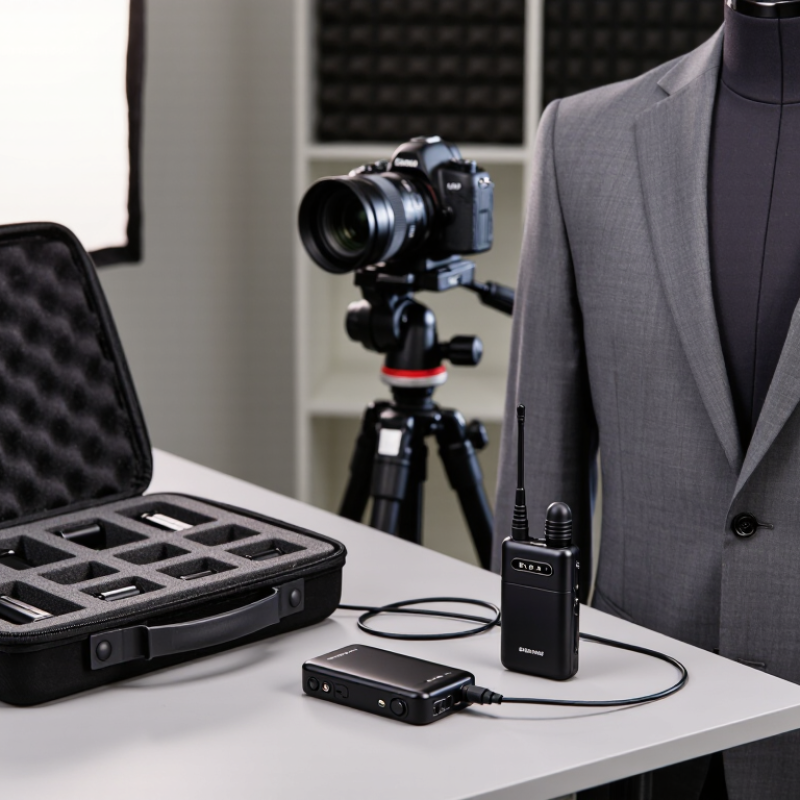
A wireless lavalier system moves a speaker’s voice from a small clip-on microphone to a camera or recorder without a cable crossing the room. The microphone captures sound near the chest. Its transmitter converts that signal into a radio transmission. A receiver picks up the transmission and sends audio through a cable to the recording device. Small parts, clear job.
Before recording, connect the microphone to its transmitter and the receiver to the camera or recorder. Select matching channels, then speak at a normal volume while watching the audio meters. If levels peak, lower the transmitter gain; if they barely move, raise it carefully. Headphones help reveal rustling, hiss, or dropouts that meters may miss. A shirt collar can rub against the capsule, even when the room sounds quiet.
The radio link needs a reasonably clear path between transmitter and receiver. Walls, crowded wireless environments, and great distance can weaken it. Digital systems may add a small delay, while analog designs can behave differently; check the system’s specifications for practical details. Battery checks matter, too. A fresh set is not a sound check. Walk the route the speaker will take, listen for interruptions, and adjust placement if needed. Sometimes the clip sits neatly, but the voice still sounds thin. That is frustrating—and a reminder that microphone position, clothing, and room acoustics all shape the result.
| System Type | How the Signal Works | Typical Frequency Band | Advantages | Things to Consider | Good Fit For |
|---|---|---|---|---|---|
| Analog UHF | The lavalier capsule connects to a bodypack transmitter, which sends an analog radio signal to a receiver. The receiver demodulates the signal and provides an audio output for a camera, recorder, or mixer. | UHF television-spectrum frequencies; usable channels and regulations vary by country and location. | Can offer flexible channel selection and dependable operation when frequencies are coordinated and the receiver has a clear signal. | Requires careful frequency coordination. Interference, distance, walls, and local spectrum use can affect reception. | Interviews, events, and productions where an operator can scan and coordinate frequencies. |
| Digital UHF | The transmitter converts the microphone signal into digital data and sends it by radio. The receiver decodes the data and outputs audio. | UHF television-spectrum frequencies; availability depends on local rules and spectrum conditions. | Digital transmission can provide consistent audio up to the point where the radio link becomes unreliable; some systems also offer encryption or selectable audio settings. | Features, latency, channel capacity, and compatibility differ by system. Frequency coordination is still important. | Video shoots, presentations, and multi-microphone work that benefits from managed UHF channels. |
| 2.4 GHz Digital | A bodypack or compact transmitter digitizes the microphone signal and sends it to a paired receiver over the 2.4 GHz band. | 2.4 GHz unlicensed band in many regions, subject to local regulations. | Often quick to set up, with compact receiver options and no need to select a television-spectrum channel. | The band is shared with devices such as Wi-Fi and Bluetooth equipment. Congestion, obstructions, and distance can affect performance. | Run-and-gun video, mobile recording, and small productions seeking a simple setup. |
| 1.9 GHz Digital | The microphone signal is digitized, transmitted from the bodypack, and reconstructed as audio by a compatible receiver. | Approximately 1.9 GHz in regions where this band is allocated for applicable wireless audio systems. | Can avoid some competing traffic found in other commonly used bands, depending on local conditions. | Availability and permitted use vary by country. Confirm that both the equipment and frequency band are approved for the location. | Indoor speech applications and productions in regions where compatible systems are permitted. |
| Single-Channel Kit | One lavalier microphone feeds one transmitter, which sends audio to one receiver channel. | Depends on the transmission band used by the kit. | Simple signal path and fewer devices to configure. | Captures one wireless microphone at a time; adding speakers may require additional compatible channels. | Solo interviews, presentations, and one-person video recording. |
| Dual-Channel Kit | Two transmitters send separate microphone signals to a receiver with two audio channels. The receiver may provide separate outputs or a combined output. | Depends on the transmission band; both radio links need suitable channel planning. | Records two people with one receiver, making it convenient for interviews and dialogue. | Check whether the receiver keeps the voices separate, how it handles a lost signal, and whether the camera input supports the required output. | Two-person interviews, co-hosted videos, and small film crews. |
How to choose: Confirm regional frequency legality, the receiver’s output and connector compatibility, the number of simultaneous microphones required, and the manufacturer’s stated operating conditions. Wireless range and performance vary with obstacles, antenna placement, interference, and the surrounding radio environment.
A clip-on microphone captures your voice near your chest. A transmitter sends the signal by radio. The receiver passes audio to a camera or recorder.
Speak at a normal volume while watching the meters. Lower gain if levels peak. Raise it carefully if the meters barely move. Use headphones, too.
Walls, crowded venues, nearby wireless devices, and distance can interrupt the connection. Keep the receiver in clear view when possible. Range claims need context.
A collar can rub against the microphone capsule and create noise. A clip may look tidy, yet the voice can still sound thin. Annoying, but useful to notice.
Check channel scanning, signal displays, battery options, gain controls, and device compatibility. Test in your actual room. Product details cannot reveal every problem.
Not always. Check charging time and remaining-power displays. Carry a spare plan, since real battery life may differ from estimates.
It can record two interview speakers through one receiver. Separate tracks help balance a quiet speaker. Extra controls still require setup time.
Walk the speaker’s route while listening for dropouts, rustling, hiss, and level changes. Turn away from the receiver, too. Ten seconds helps, though it may not catch everything.
Wireless Lavalier Microphone Systems make it possible to capture clear speech while keeping speakers free to move, making them useful for interviews, presentations, video production, and other recording situations. They typically transmit audio from a small microphone to a receiver connected to a recording device. When comparing systems in 2026, consider sound quality, operating range, battery life, connection options, ease of use, and resistance to interference. The best choice depends on where and how you record: a compact, simple setup may suit casual creators, while multi-speaker recordings may call for more channels and flexible controls.
Before recording, check that the microphone, transmitter, and receiver are connected and that audio levels are appropriate. Test the system in the intended location, keep batteries charged, and store equipment carefully to support reliable performance. Wireless systems can still face limitations, including signal dropouts, background noise, and restricted range, so monitoring audio and having a backup plan can help. Comparing practical features with your recording needs will make it easier to choose a system that delivers dependable results.